
If you hold an excise (antahshulka) permit in Nepal and it’s time for renewal, you no longer need to visit the Inland Revenue Office in person. The IRD’s Integrated Tax System now lets taxpayers self-renew their excise permit entirely online — from submitting the renewal application to making payment and downloading the updated certificate. This guide walks you through the complete step-by-step process for the self permit renew of your excise (antahshulka) permit, based on the official IRD SOP, so you can complete your renewal quickly and without errors.
It is the taxpayer’s own responsibility to apply for renewal online, complete the payment, and download the permit.
Step-by-Step Process to Self-Renew Your Excise Permit
Step 1: Visit the IRD Taxpayer Portal
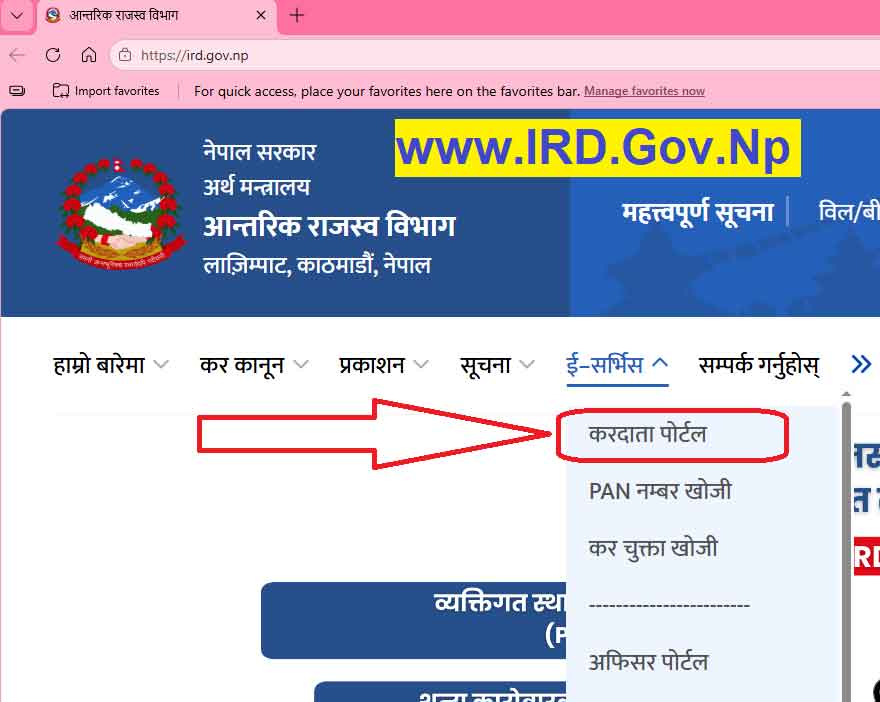
Go to the Inland Revenue Department’s official website, ird.gov.np, and click on the Taxpayer Portal.
Step 2: Open the Excise Menu
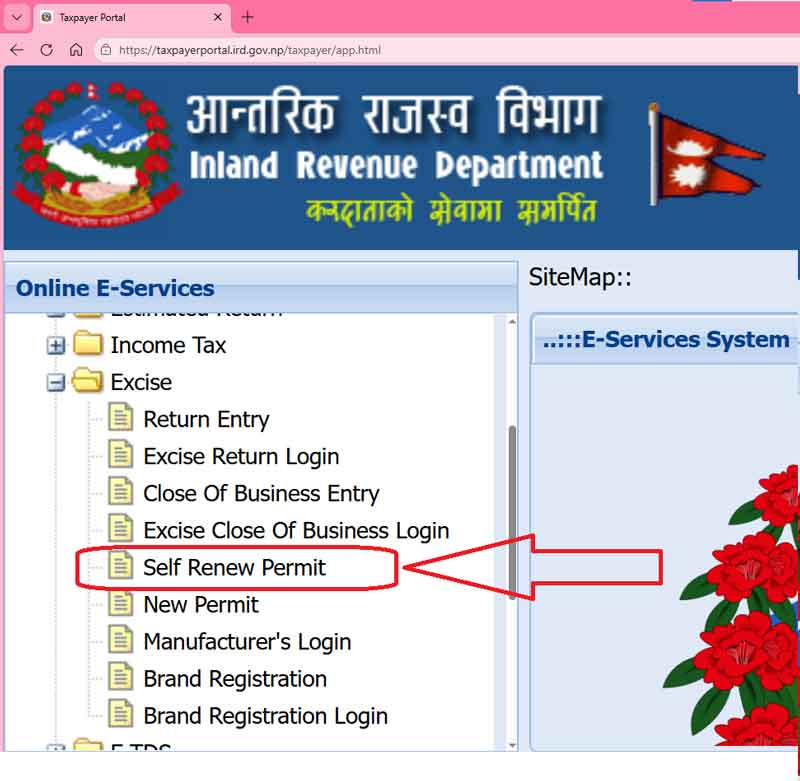
On the portal’s left-side menu, click the ‘+’ icon next to ‘Excise’ to expand it.
Step 3: Click ‘Self Renew Permit’
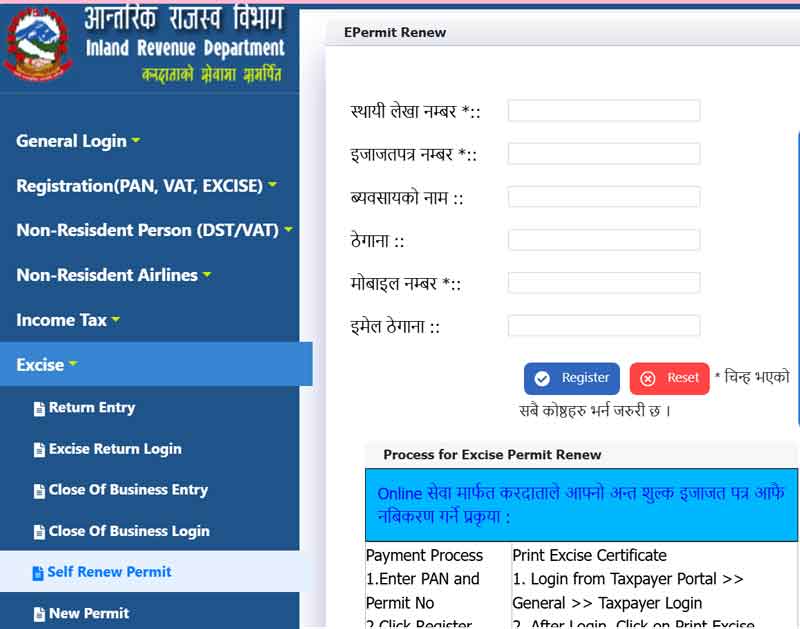
Select ‘Self Renew Permit’ from the expanded Excise menu. This will open the EPermit Renew form.
Step 4: Fill in the Required Details
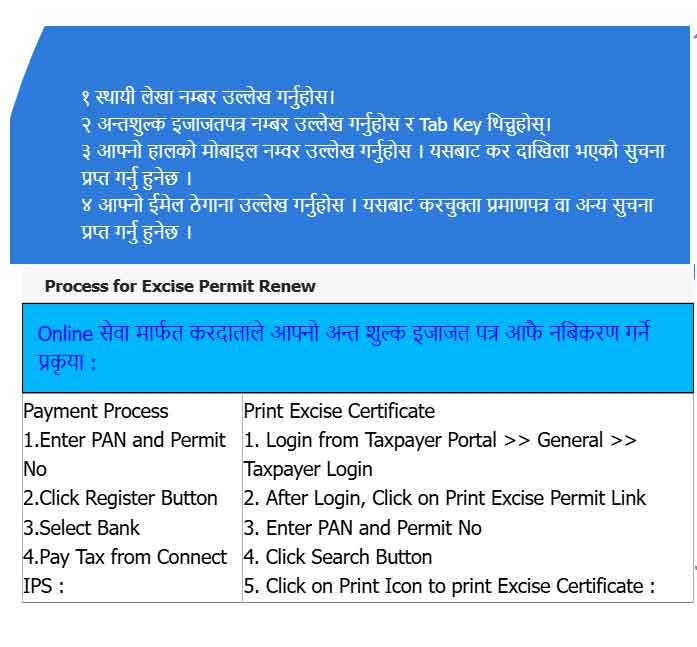
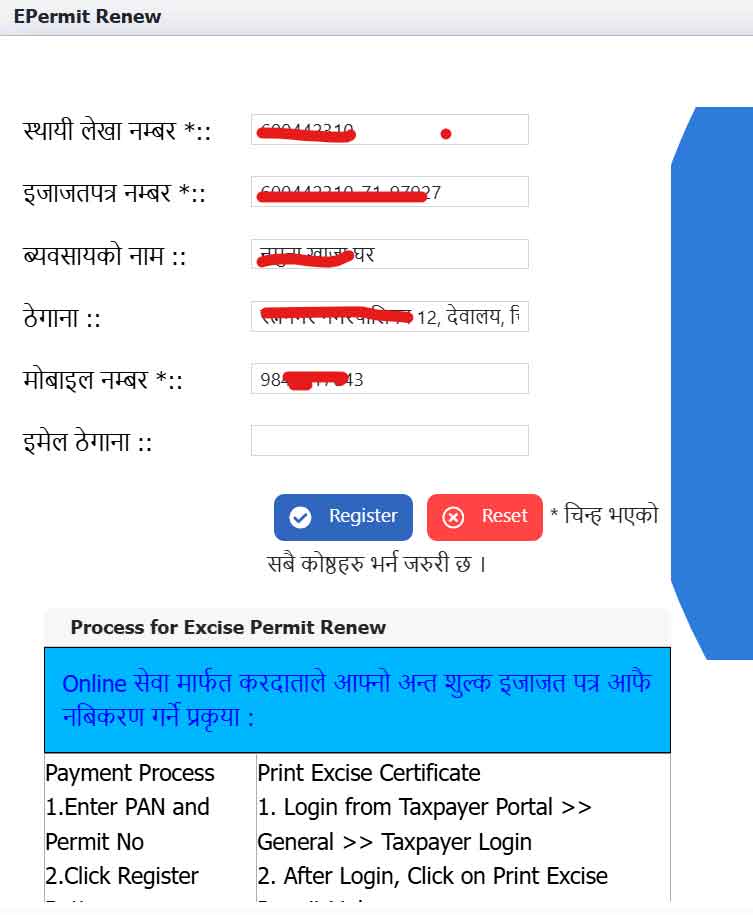
Complete the form with the following information:
| Field | Details |
|---|---|
| PAN | Enter your Permanent Account Number |
| Permit Number | Enter your excise permit number (found on your permit certificate), then press Tab |
| Business Name | Auto-filled once PAN and Permit Number are correctly entered |
| Address | Auto-filled once PAN and Permit Number are correctly entered |
| Mobile Number | Enter your current mobile number — used to send tax payment confirmations |
| Enter your email address |
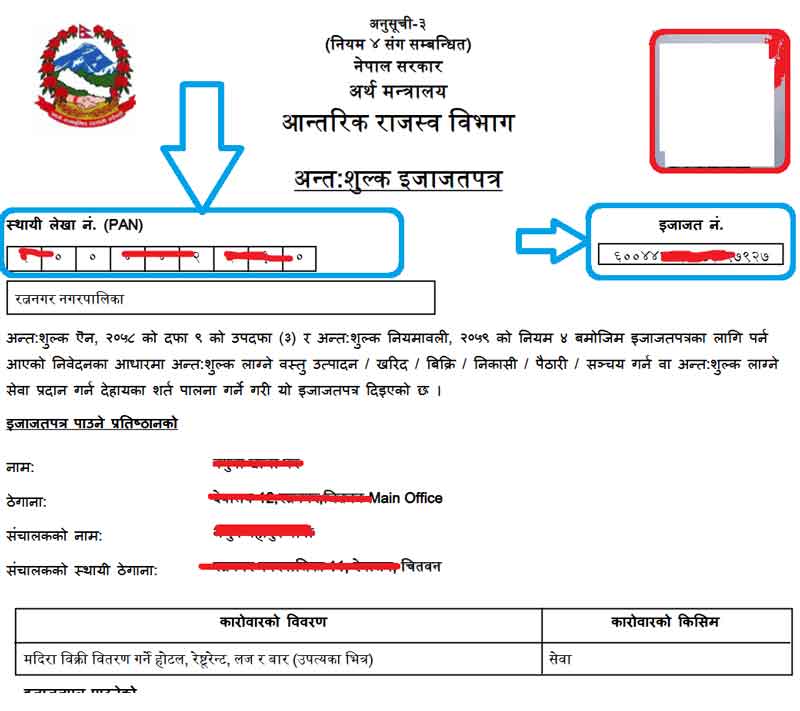
=> Apply Excise Antashulka Online Renew Permit
Step 5: Check for Outstanding Dues
If you have any pending tax dues, a warning message will appear:
“You may have Tax Due. Please login taxpayer portal to see the due or contact revenue office.”
If this happens, log in to the taxpayer portal, clear any outstanding income tax, VAT, or excise dues, and then repeat the renewal process.
If there are no dues, proceed to the next step.
Step 6: Register the Renewal Request
Once all fields are filled and there are no outstanding dues, click the “Register” button.
Step 7: Review Permit and Payment Details
The next screen will automatically display:
- Permit details (PAN, permit number, business name, address, office code, mobile/email)
- Permit Activity — item code, item name, and activity description
- Payment section — item code, item name, fiscal year, “from” and “to” dates, amount, arrears (if any), and total payable amount
Step 8: Select the Fiscal Year(s) for Renewal
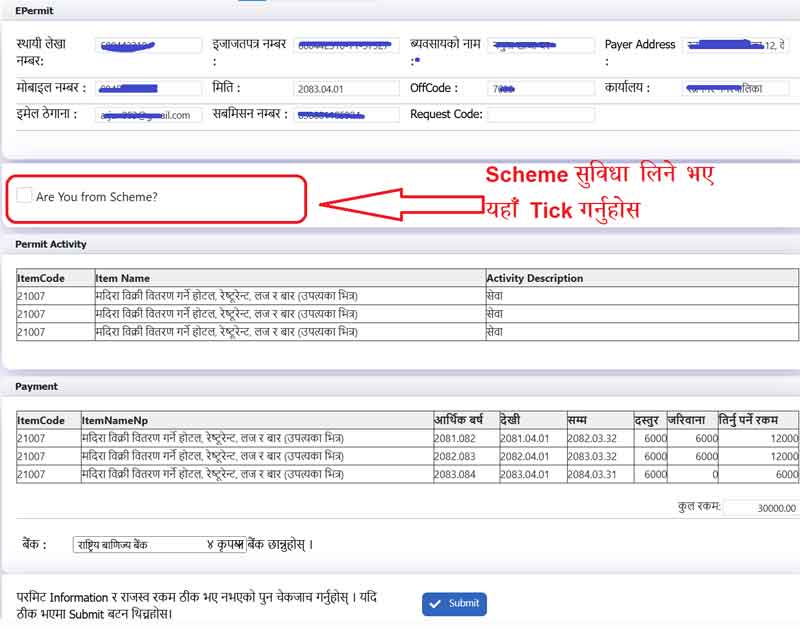
Choose which fiscal year(s) you are renewing for. Important: if you have unrenewed permits from previous fiscal years, you must renew those along with the current fiscal year — the system will not allow you to skip pending years.
The revenue amount payable for each selected fiscal year is calculated and displayed automatically.
Step 9: Choose Your Payment Bank
Select the bank you wish to use for payment from the dropdown list, then click “Submit.”
Payment Process
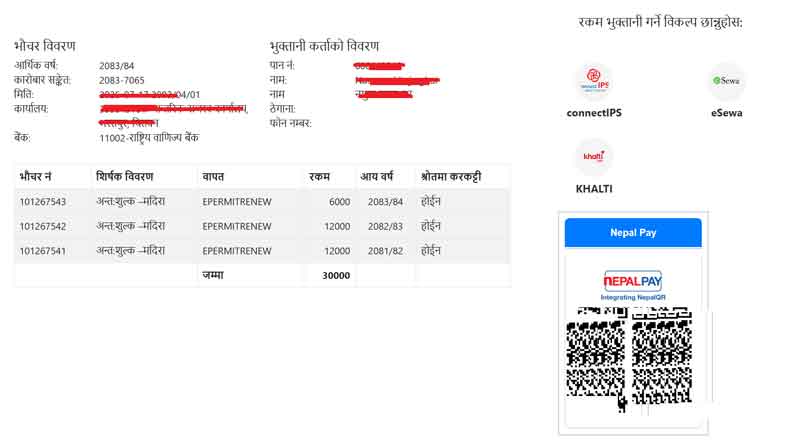
- After submitting your renewal details, a payment pop-up window (voucher) will appear, showing:
- Fiscal year
- Transaction reference number
- Date
- Office name
- PAN, payer name, and address
- Itemized voucher details (e.g., liquor excise, tobacco/cigarette excise) with amounts and total
- Choose your payment method — for example, Connect IPS.
- Click Make Payment).
- Complete the payment through your selected payment system/bank gateway.
How to Print Your Renewed Excise Permit
Step 1: Log In to the Taxpayer Portal
From the portal, go to General > Taxpayer Login.
Step 2: Enter Login Credentials
Enter your PAN, username, and password, then click “Login.”
=> Apply Excise Antashulka Online Renew Permit
Note:
- If you haven’t changed your password yet, log in using your old VAT username with the password same as the username, then change the password to activate.
- If you don’t have a VAT username, use your Income Tax username with the password same as the username, then change it to activate.
Step 3: Go to Excise Certificate Print
Click the “Excise Certificate Print” button.
Step 4: Enter PAN and Permit Number
Fill in your PAN and permit number in the search form.
Step 5: Click Search
Click the “Search” button. The system will display your permit details, including:
- Business name and address
- Mobile number
- Payment history (item code, item name, permit “from” and “to” dates, approval date, and registration type)
Step 6: Print the Permit
Click the Print icon next to the relevant entry to print your renewed excise permit certificate.
Quick Recap: Excise Permit Self-Renewal Checklist
- PAN and excise permit number ready
- Mobile number and email address updated
- Check for and clear any outstanding tax dues
- Select correct fiscal year(s) — including any pending previous years
- Choose payment bank and complete payment
- Log in to taxpayer portal to print the renewed certificate
Frequently Asked Questions (FAQs)
1. Where can I renew my excise permit online?
Through the IRD Taxpayer Portal at ird.gov.np, under Excise > Self Renew Permit.
2. What if I have outstanding tax dues?
You must clear all outstanding income tax, VAT, or excise dues first, then repeat the renewal process.
3. Can I renew only for the current fiscal year if I missed previous years?
No. You must renew all pending previous fiscal years along with the current one.
4. How do I get a printed copy of my renewed permit?
Log in to the Taxpayer Portal, go to General > Taxpayer Login, then use “Excise Certificate Print” to search and print your certificate.
5. What payment methods are available?
Payment can be made through available bank options, including Connect IPS, shown in the payment pop-up window.