

Nepal Mirco Insurance IPO Result Date & How to Check Nepal Micro insurance IPO. Nepal Micro Insurance Limited has recently opened its Initial Public Offering (IPO) for the general public. Are you waiting anxiously to find out if you’ve been allotted shares in a recent IPO? In Nepal, checking your IPO share results is a straightforward process once you know the right steps. This guide will walk you through all the methods available to check your IPO allotment status quickly and easily. NIMB ACE Capital has accelerated its preparations to publish its results next Friday.
NIMB ACE Capital serves as the share sales manager for the company. This is the first micro non-life insurance company to receive authorization from the Nepal Insurance Authority.
What is an IPO? Nepal Micro Insurance Company IPO
An Initial Public Offering (IPO) occurs when a private company offers its shares to the public for the first time. In Nepal, IPOs are popular investment opportunities that often see high application volumes, resulting in many investors using the share allotment process to determine who receives shares.
Regulations require such companies to maintain a minimum paid-up capital of 75 crore rupees. Currently, the company has a paid-up capital of 52.5 crore rupees and plans to raise an additional 22.5 crore rupees from the general public.
Nepal Micro Insurance IPO Results How to Check
1. CDSC Meroshare Portal
The most convenient method is through the Meroshare platform:
- Log in to your Meroshare account at meroshare.cdsc.com.np
- Navigate to the “My ASBA” section
- Select “Application Report”
- Find your application in the list and check the status
- If allotted, the number of shares will be displayed
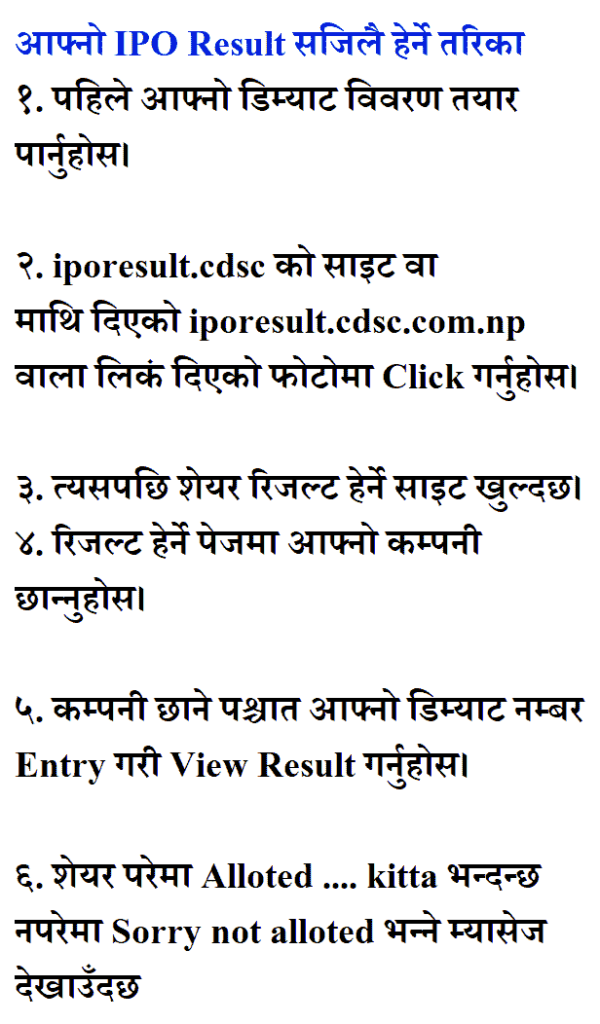
2. Nepal Stock Exchange (NEPSE) Website
- Visit the official NEPSE website at nepalstock.com.np
- Look for the “IPO Results” or “Announcements” section
- Find the specific company’s IPO result
- Search for your application using your BOID or application number
3. Issue Manager’s Website
- Visit the website of the issue manager handling the IPO- NIMB ACE CAPITAL LIMITED
- Navigate to their “IPO Results” section
- Select the company whose IPO result you want to check
- Enter your BOID or application number to view your allotment status
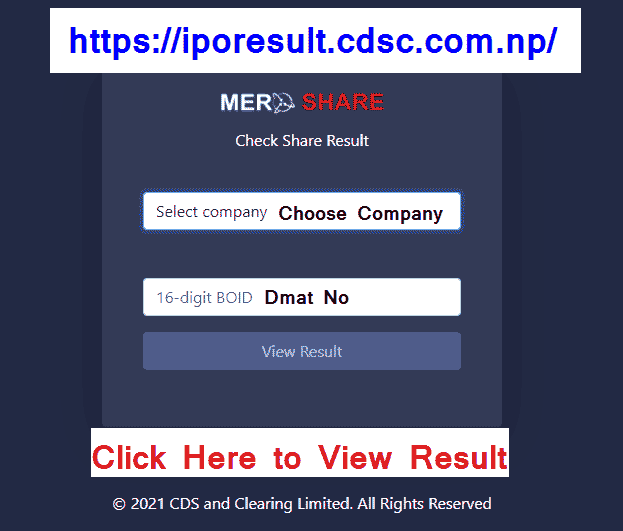
4. Mobile Apps
Several Nepal-specific investment apps now offer IPO result checking:
- Download apps like MeroShare App, NepalStock, or your bank’s mobile app
- Log in with your credentials
- Navigate to the IPO results section
- Enter your details to check your allotment status
What You Need to Check IPO Results
Before checking your IPO results, make sure you have:
- Your BOID (Beneficiary Owner ID) number
- The application number from your IPO application
- Your name as registered with CDSC
- Your citizenship number or other identification details
What Happens After Allotment?
If you’ve been allotted shares:
- The shares will automatically appear in your DEMAT account
- You can sell these shares after they are listed on NEPSE (typically after 1-2 weeks)
- If you received fewer shares than you applied for, the remaining amount will be refunded to your bank account
=> Click Here to view/ Check IPO Result
Tips for Future IPO Applications
- Always apply through your bank’s ASBA facility
- Ensure your DEMAT account is active
- Apply early to avoid last-minute technical issues
- Keep your BOID and application numbers handy for checking results
Checking your IPO share result in Nepal has become increasingly digital and convenient. By using any of the methods outlined above, you can quickly determine whether you’ve been lucky in the share allotment process.
=> Click Here to view/ Check IPO Result
Also view:
1. View All Job Vacancy Notice Details
2. View All TU Exam Result Center Update
3. View All Lok Sewa Exam Vacancy Tayari