

A Voter ID card (also known as Voter Identity Card) is an essential document for every Nepali citizen who wants to exercise their democratic right to vote. Voter ID Card Registration Online Nepal. The Election Commission of Nepal has made the process of voter registration significantly easier by introducing online services. This comprehensive guide will walk you through the complete process of voter ID card registration online in Nepal and how to download your voter card.
What is a Voter ID Card in Nepal?
A Voter ID card is an official identification document issued by the Election Commission of Nepal to eligible voters. It serves as proof of your registration in the electoral roll and allows you to participate in local, provincial, and federal elections. The card contains your personal information, photograph, and a unique voter identification number.
Eligibility Criteria for Voter Registration
Before applying for a voter ID card online, ensure you meet these eligibility requirements:
- Age: You must be at least 16 years old
- Citizenship: You must be a Nepali citizen with a valid citizenship certificate
- Residency: You should be a permanent or temporary resident of the area where you’re registering
- Mental capacity: You must be of sound mind
- Legal status: You should not be disqualified by any law from voting
How to Register for a Voter ID Card Online in Nepal
The Election Commission of Nepal has digitized the voter registration process. Follow these steps to register online:
Step 1: Visit the Official Portal
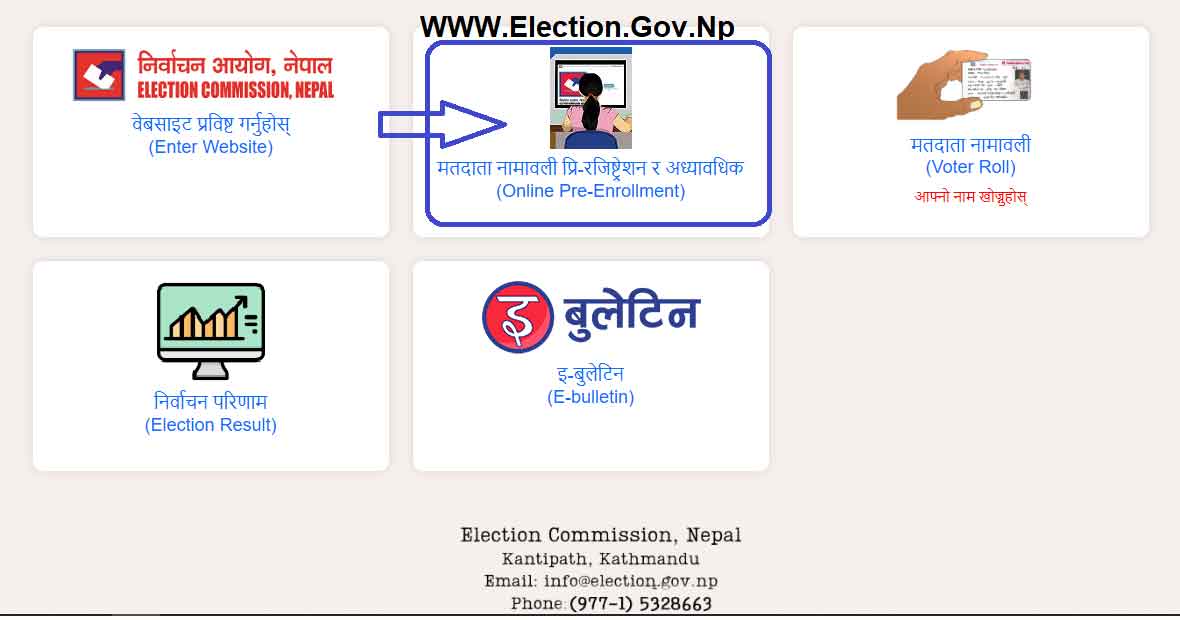
Go to the Election Commission Nepal’s official website at www.election.gov.np or the dedicated voter registration portal. (URL Link given below) Make sure you’re accessing the authentic government website to avoid fraud.
Step 2: Access the Online Registration Form
Navigate to the voter registration section. Look for options like Online Pre Enrollment or “New Voter Registration,” or “Voter List Management” on the homepage.

Step 3: Fill in Personal Information
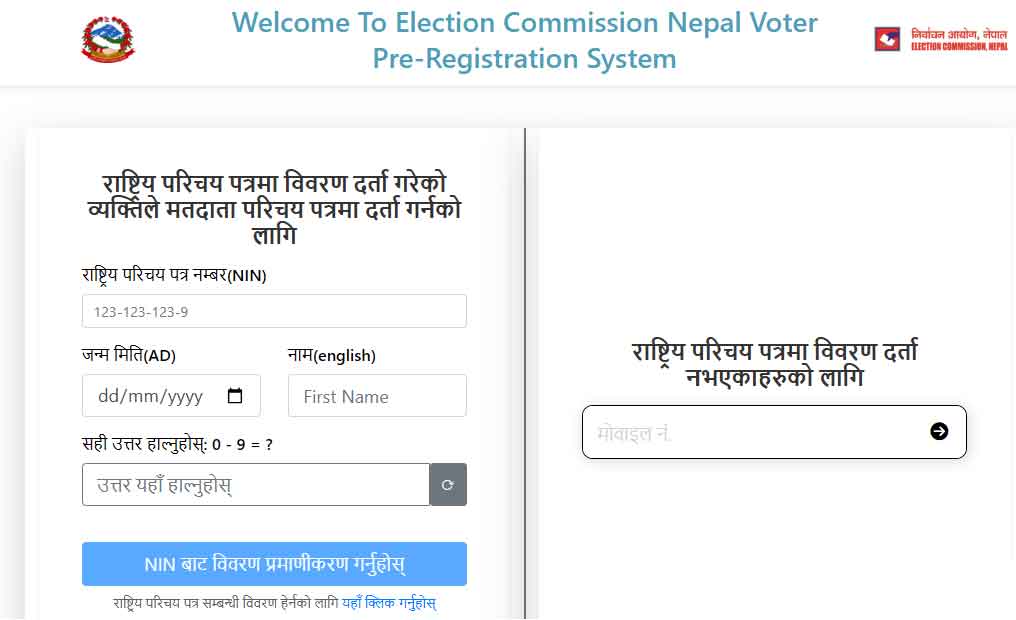
Complete the online registration form with accurate details: If you have a National Identity Number NIN, please provide all data in the first dialog box; if you do not have a NIN, you need to register through your mobile number in the given right-side dialog box.
- Full name (as per citizenship certificate)
- Date of birth
- Gender
- Father’s and mother’s names
- Permanent address (Province, District, Municipality/Rural Municipality, Ward Number)
- Contact number
- Email address (if available)
Step 4: Upload Required Documents
Prepare digital copies of these documents before starting:

- Citizenship certificate (front and back)
- Recent passport-size photograph (with white background)
- Additional ID proof (if required)
Ensure all scanned documents are clear, in the specified format (usually JPG or PDF), and within the size limit (typically 200-500 KB).

Important Points to Note Before Filling Out the Application:
- The form can be filled out in both Nepali and English. To switch between languages, configure the input settings accordingly.
- To type in Nepali, you can use either Nepali Unicode Traditional or Nepali Unicode Romanized layout.
- Information regarding the keyboard layout can be found in the above links.
- By default, Nepali Unicode Romanized is selected.
- Conversion between Bikram Sambat (BS) and A.D. (Gregorian) dates is automatic.
- Fields marked with “*” are mandatory.
- You can save your progress by clicking Save Draft after filling in the mandatory fields.
Step 5: Select Your Polling Station
Choose your preferred polling station based on your residential address. The system will show available polling stations in your ward.
Step 6: Submit Application
Review all entered information carefully before submission. Once satisfied, click the submit button. You’ll receive an application reference number or receipt. Save this number for future tracking.
Step 7: Verification Process
In the Appointment Location dropdown, select your preferred location and time for submitting the application and biometrics.
After clicking Submit, you will receive a 9-digit application number.
- Write it down and keep it safe.
- Print the form containing the application number.
- Bring the form, along with required documents and a passport-size photo, to the chosen appointment location on the scheduled date.
=> Apply Online Voter ID Card Registration Entry
Documents to Bring for Biometrics and Photo Submission:
- The printed form containing the 9-digit application number.
- A copy of your Citizenship Certificate.
- A copy of your Residence Certificate (if you are applying from a temporary address).
- A copy of your Marriage Registration Certificate (for married women applicants).
Alternative Registration Methods
If online registration isn’t feasible, you can register through these methods:
In-Person Registration
Visit your local election office or ward office with original documents and passport-size photographs. Fill out the physical form and submit it to the concerned officer.
Mobile Registration Camps
During election periods, the Election Commission organizes mobile registration camps in various locations. These camps make registration accessible to citizens in remote areas.
Through Ward Offices
Your local ward office can assist with voter registration. They have designated staff to help citizens complete the registration process.
How to Download Voter Card Online in Nepal
Once your registration is approved and your name appears in the electoral roll, you can download your voter card:
Method 1: Through Election Commission Portal
- Visit the official Election Commission Nepal website
- Go to the “Voter List” or “Electoral Roll” section
- Enter your details (name, citizenship number, or voter ID number)
- Search for your name in the voter list
- If your name appears, look for the download or print option
- Download your voter card in PDF format
- Print it on quality paper for durability
=> Apply Online Voter ID Card Registration Entry
How to Check Voter Registration Status Online
To verify if your registration is complete:
- Go to the Election Commission Nepal website
- Navigate to “Search Voter List” or “Check Registration Status”
- Enter your citizenship number or application reference number
- Submit the query
- View your registration status and details
You can check whether your name is included in the voter list, your voter ID number, and your designated polling station.
Voter List Updates and Corrections
The electoral roll is a dynamic document. You can request updates for:
- Change of address: If you’ve moved to a new location
- Name correction: Due to spelling errors or marriage
- Photo update: For recent photographs
- Removal of deceased persons: Family members can request removal
- Transfer of polling station: If you want to vote at a different station
Submit update requests during the designated update period announced by the Election Commission.
Tips for Successful Online Registration
- Use a stable internet connection to avoid form submission errors
- Keep all documents scanned and ready before starting
- Fill out forms during off-peak hours for faster website loading
- Double-check all information before submitting
- Save your reference number in multiple places
- Use a valid email address and mobile number for communication
- Ensure your photograph meets specifications (white background, clear face)
Frequently Asked Questions
Can I register online if I’m living abroad? Nepali citizens living abroad can register for absentee voting through Nepali embassies and consulates. Check with your nearest Nepali diplomatic mission.
Is the voter ID card the same as the citizenship certificate? No, the voter ID card specifically identifies you as a registered voter, while the citizenship certificate proves your Nepali nationality. Both are different documents.
How long does the registration process take? Online submission takes 15-20 minutes. Verification and approval typically take 7-15 days, depending on the district and workload.
Can I vote without a voter ID card? You need to be registered in the voter list to vote. The physical card serves as proof, but if you’ve lost it, you can still vote if your name appears in the list at the polling station with a valid ID.
What if I made a mistake in my application? If you notice errors before submission, correct them immediately. After submission, contact the election office with your reference number to request corrections.
Conclusion
Obtaining a voter ID card through online registration in Nepal has become a straightforward process thanks to the Election Commission’s digitalization efforts. By following this guide, you can complete your registration, download your voter card, and ensure you’re ready to participate in Nepal’s democratic process.